This article gives brief overview of fundamnetal networking concepts in Kubernetes.
First thing one notices with Kubernetes in comparision to other container orchestration platforms is container itself is not a first class construct in Kubernetes. Containers always exists in the context of pod. So first lets understand the basic Kubernetes building block Pod that consumes network. A pod is a group of one or more containers that are always co-located and co-scheduled, and run in a shared context. The shared context of a pod is a set of Linux namespaces, cgroups etc. Containers within a pod share an IP address and port space, and can find each other via localhost. They can also communicate with each other using standard inter-process communications. Think of it as an application-specific “logical host” containing one or more application containers which are relatively tightly coupled. Containers in different pods have distinct IP addresses and can not communicate by IPC. Please refer to Pod overview for further details. As far as networking is concerned pod is the network endpoint. So essentially Kubernetes networking is all about Pods. With that note lets procced.
Networking functionality in Kubernetes (as of 1.6.1) broadly address below problems:
- How cross-node pod-to-pod connectivity (for east-west traffic) is achieved.
- How the services running in the pods are discovered by other pods, and how pod-to-pod traffic is load balanced when consuming a service.
- How services running in the pod’s are exposed for external access from clients outside the cluster (for north-south traffic).
- How with network segmentation, pods are secured by restricting network access to pods
- How high availability, global load balancing etc can be achieved in federated multi-cluster deployments
This article covers first four of above functionalities.
Cross node pod-to-pod network connectivity
While Kubernetes is opinionated in how containers are deployed and operated, it is very non-prescriptive of how the network should be designed in which pod’s are to be run. Kubernetes imposes the following fundamental requirements on any networking implementation (barring any intentional network segmentation policies):
- All pods can communicate with all other pods without NAT
- All nodes running pods can communicate with all pods (and vice-versa) without NAT
- IP that a pod sees itself as is the same IP that other pods see it as
For the illustration of these requirements let us use a cluster with two cluster nodes. Nodes are in subnet 192.168.1.0/24 and pods use 10.1.0.0/16 subnet, with 10.1.1.0/24 and 10.1.2.0/24 used by node1 and node2 respectively for the pod IP’s.
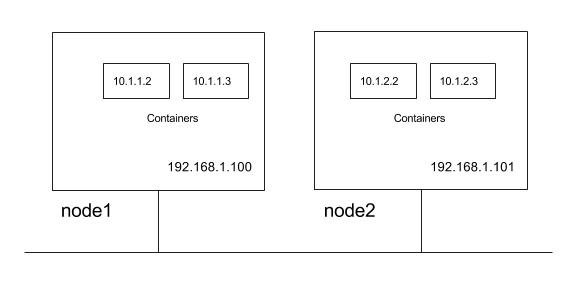
So from above Kubernetes requirements following communication paths must be established by the network.
- nodes should be able to talk to all pods. For e.g. 192.168.1.100 should be able to reach 10.1.1.2, 10.1.1.3, 10.1.2.2 and 10.1.2.3 directly (with out NAT)
- a pod should be able to communicate with all nodes. For e.g. pod 10.1.1.2 should be able to reach 192.168.1.100 and 192.168.1.101 without NAT
- a pod should be able to communicate with all pods. For e.g 10.1.1.2 should be able to communicate with 10.1.1.3, 10.1.2.2 and 10.1.2.3 directly (with out NAT)
As we will explore these requirements lays foundation for how the services are discovered and exposed. There can be multiple way to design the network that meets Kubernetes networking requirements with varying degree of complexity, flexibility.
Network implementation for pod-to-pod network connectivity
Kubernetes does not orchestrate setting up the network and offloads the job to the CNI plug-ins. Please refer to the CNI spec for further details on CNI specification. Below are possible network implementation options through CNI plugins which permits pod-to-pod communication honouring the Kubernetes requirements:
- layer 2 (switching) solution
- layer 3 (routing) solution
- overlay solutions
layer 2 solution
This is the simplest approach should work well for small deployments. Pods and nodes should see subnet used for pod ip’s as a single l2 domain. Pod-to-pod communication (on same or across hosts) happens through ARP and L2 switching. We could use bridge CNI plug-in to reuse a L2 bridge for pod containers with below configuration on node1 (note /16 subnet).
 {
     "name": "mynet",
     "type": "bridge",
     "bridge": "kube-bridge",
     "isDefaultGateway": true,
     "ipam": {
         "type": "host-local",
         "subnet": "10.1.1.0/16"
     }
 }
kube-bridge need to be pre-created such that ARP packets go out on the physical interface. In order for that we have another bridge with physical interface connected to it and node ip assigned to it to which kube-bridge is hooked through the veth pair like below.
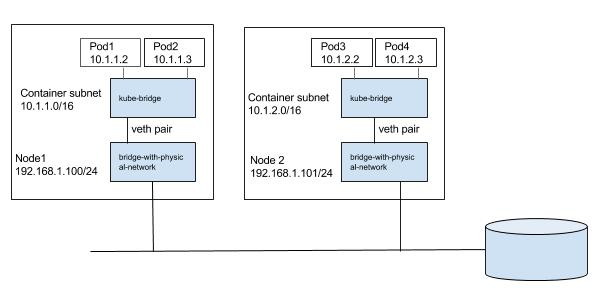
We can pass a bridge which is pre-created, in which case bridge CNI plugin will reuse the bridge, only change it would do is to configure gateway for the interface.
layer 3 solutions
A more scalable approach is to use node routing than switching the traffic to the pods. We could use bridge CNI plug-in to create a bridge for pod containers with gateway configured. For e.g. on node1 below configuration can be used (note /24 subnet).
 {
     "name": "mynet",
     "type": "bridge",
     "bridge": "kube-bridge",
     "isDefaultGateway": true,
     "ipam": {
         "type": "host-local",
         "subnet": "10.1.1.0/24"
     }
 }
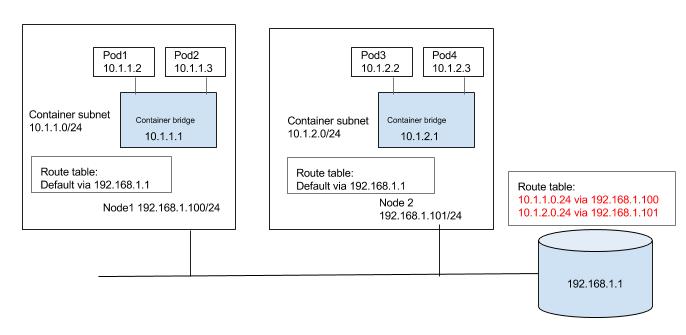
So how does pod1 with ip 10.1.1.2 running on node1 communicate with pod3 with ip 10.1.2.2 running on node2? we need a way for nodes to route the traffic to other node pod subnets.
We could populate default gateway router with routes for the subnet as shown in the below diagram. Route to 10.1.1.0/24 and 10.1.2.0/24 is configured to be through node1 and node2 respectively. We could automate keeping the route tables updated as nodes are added or deleted in to the cluster. We can also use some of the container networking solutions which can do the job on public clouds, for e.g. Flannel back end for AWS and GCE, Weaves AWS-VPC mode etc.
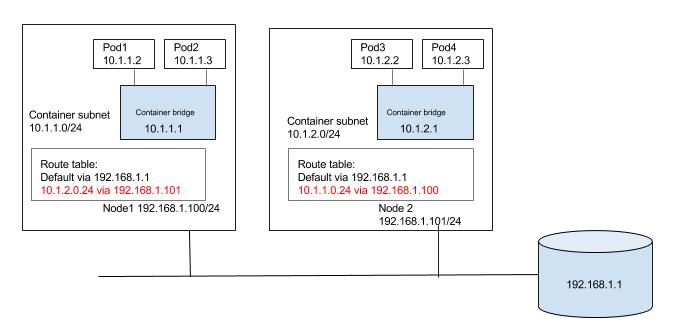
Alternativley each node can be populated with routes to the other subnets as shown in the below diagram. Again updating the routes can be automated in small/static environment as nodes are added/deleted in the cluster. Or container networking solutions like calico, or Flannel host gateway back end can be used to achieve same.
overlay solutions
Unless there is a specific reason an overlay solution for Kubernetes does not make sense considering the networking model of Kubernetes and lack of support for multiple networks. Kubernets requires that nodes should be able to reach pod, even though pods are in overlay network. Similarly pod should be able to reach any node as well. We will need host routes in the nodes set such that pods and nodes can talk to each other. Since inter host pod-to-pod traffic should not be visible in the underlay, we need a virtual/logical network that is overlaid on the underlay. Pod-to-pod traffic need to be encapsulated at the source node. The encapsulated packet is then forwarded to destination node where it is de-encapsulated. A solution can be built around any existing Linux encapsulation mechanisms. We need to have tunnel interface (with VXLAN, GRE etc encapsulation) and host route such that inter node pod-to-pod traffic is routed through the tunnel interface. Below is very generalized view of how a overlay solution can be built that can meet Kubernetes network requirements. Unlike previous solutions there is significant effort in overlay approach setting up tunnels, populating FDB etc. Existing container networking solutions like Weave, Flannel can be used to setup a Kubernetes deployment with overlay networks.

service discovery and load balancing
With the understanding of Kubernetes network requirements of how cross-node pod-to-pod, and node to pod communication works, lets explore the critical functionality of service discovery and load-balancing. Any non-trivial containerized application will end up running multiple pods running different services (a web server, DB server etc). This leads to a problem: how some set of Pods running a service provide functionality to other Pods inside the Kubernetes cluster, how do a service consuming pod find out and keep track of which backend pods are providing a service? Problem is compounded by the fact that pods itself can be ephemeral.
services and endpoints
Service abstraction in Kubernetes is essential building block that helps in service discovery and load balancing. A Kubernetes Service is an abstraction which defines a logical set of Pods based on labels. Labels are key/value pairs that are attached to objects, such as pods. The label selector is the core grouping primitive in Kubernetes, that can identify a set of objects with matching labels. Kubernetes service leverages label selector to group set of Pods targeted by a Service. Use of labels to group pods to service significantly eases the managing target pool of pods. Traditionally managing pool of endpoints or targets to load balanced service is explicitly done by adding or removing endpoint (for e.g adding instance to AWS ELB, GCE load balancer). Kubernetes implicitly manages endpoitns of service through use of labels.
Set of pods forming the service is dynamic set, so Kubernetes provides another abstraction of endpoints for the service which gives the list of pods matching the service at the point of query.
Lets walk through an example. In the below example first we created 2 pods each marked with label ‘app=nginx’ and expose port 80. We created a service with selector matching labels ‘app=nginx’.
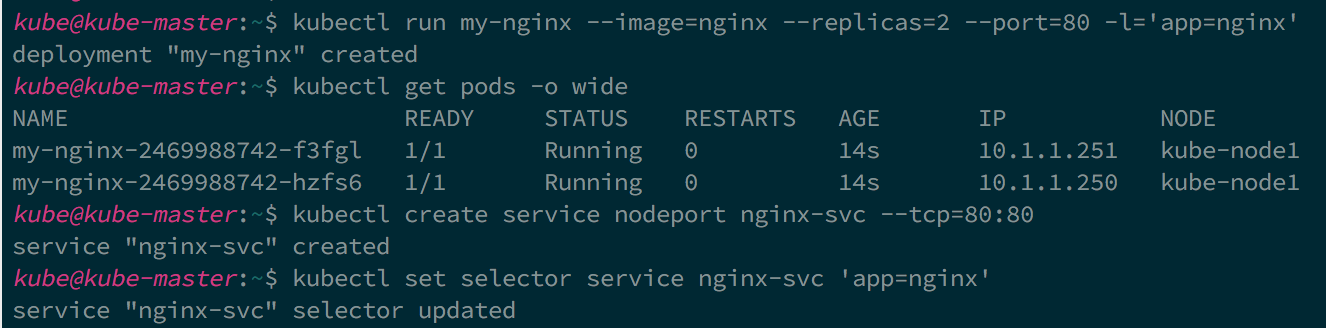
As you can see both the pods selected as endpoints for the service.
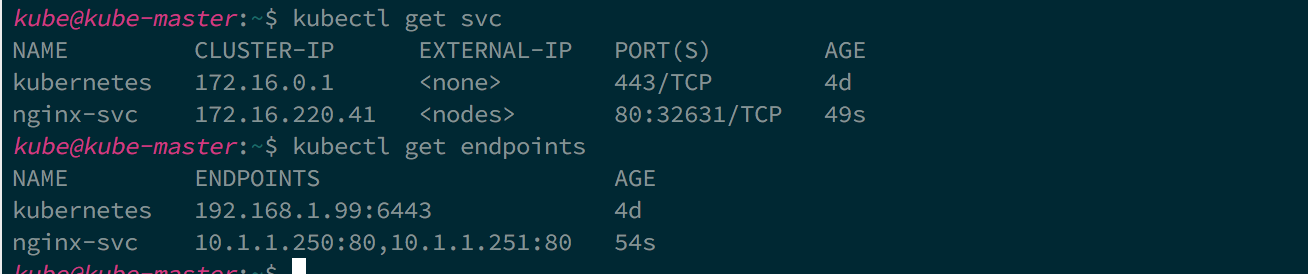
exposing service
A pod that want to consume service, can get list of endpoints and do client side loadbalancing to manage how and to which endpoint it connects. But the most common case is server side load balancing where a service endpoints are fronted by virtual ip and load balancer that load balances traffic to virtual ip to endpoints. Idea of load balancing traffic to service endpoints is integrated in to Kubernetes service defintion. Kubernetes allows to specify what kind of service you want. Following are the service types and their behaviors:
- ClusterIP: A service of ClusterIP type exposes the service on a cluster-internal IP. Choosing this value makes the service only reachable from within the cluster. Cluster internal IP is allocated from the cluster CIDR for the service, and acts as VIP on each node that can be reached by the pods. Cluster IP is not routable, and can be reached only by the pods running on the node.
- NodePort: Exposes the service on each Node’s IP at a static port (the NodePort). You’ll be able to contact the NodePort service, from outside the cluster, by requesting :.
- LoadBalancer: Exposes the service externally using a cloud provider’s load balancer. NodePort and ClusterIP services, to which the external load balancer will route, are automatically created.
Both ClusterIP and NodePort service types are expected to create service proxy on the node, which can be accessed by the pods running on the node in case of ClusterIP and accessed from the cluster in case of NodePort. Service proxy load balances traffic to the appropriate endpoint of the service. Hopefully this explains the network requirements of Kuberntes that we discussed earlier where a pod can reach a node and vice versa.
service discovery
Kubernetes API provide all the details about the service, but how does pods learn the details of the service? Kubernetes supports 2 primary modes of finding a Service. When a Pod is run on a Node, the kubelet adds a set of environment variables for each active Service with pre-defined convention on the environment variable names. Other alternative is to use built Kubernetes DNS service which can be added as addon in the cluster. The DNS server watches the Kubernetes API for new Services and creates a set of DNS records for each. If DNS has been enabled throughout the cluster then all Pods should be able to do name resolution of Services automatically.
kube-proxy
Kube-proxy is core component of Kubernetes running on each node, that uses iptables to provide a service proxy. Kube-proxy configures iptables such that both Cluster IP and Node ports are available as services on the node for the pods. Traffic is not exactly load balanced but forwarded equally to the endpoints of the service. Kube-proxy provides only L4 load balancing. Kube-proxy itself is not a mandatory component and is replaceable. It just provides out-of-box service proxy solution. If you want L7 load balancing between the services, or use true load balancer like HAproxy, Nginx there are community solutions (for e.g. Linkerd) that are available.
Ingress resource and Ingress controller
While Kubernetes abstraction of services provide a discovery and internal load balancing for the pods with in the cluster, we need a way to expose the service externally to the internet (north-source traffic). An Ingress abstraction in Kubernetes is a collection of rules that allow inbound connections to reach the cluster services. Ingress abstraction only gives a mechanism to define the rules, but you will need an implementation of these rules, known as ‘Ingress Controlles’. Kubernetes does not come with a default or out-of-box ingress controller but there are third party solutions like Traefik, Nginx are available as ingress controllers. Ingress controller also provide L7 load balancing unlike cluster services.
Network policies
We have learned so far how pods can communicate with each other directly or through service proxy. We also learned how pods through services get exposed externally out side the cluster. Now logical question is how do we secure pods? A network policy in Kubernetes, is a specification of how selections of pods are allowed to communicate with each other and other network endpoints.
Isolation policies are configured on a per-namespace basis. Once isolation is configured on a namespace it will be applied to all pods in that namespace. Currenlty only ‘DefaultDeny’ policy is configurable on namespace. Once configured, all the pods in the namepace ingress is blocked. You need to explicitly configure whitelist rules through the network policies. Network policies leverage existing core Kubernetes concepts labels and provide elegant way of expressing application security intents. For e.g below network policy consicley express, intent that only pods with matching label of ‘role: frontend’ can access the pods with matching label of ‘role: db’ on port 6379 in that namespace.
apiVersion: extensions/v1beta1
kind: NetworkPolicy
metadata:
  name: test-network-policy
  namespace: default
spec:
  podSelector:
    matchLabels:
      role: db
  ingress:
   - from:
     - namespaceSelector:
       matchLabels:
         project: myproject
     - podSelector:
       matchLabels:
       role: frontend
   ports:
     - protocol: tcp
     port: 6379
Conclusion
We have covered how the cross-node pod-to-pod networking works, how services are exposed with in the cluster to the pods, and externally. What makes Kubernetes networking interesting is how the design of core concepts like services, network policy ete permits several possible implementations. Though some core components and addons provide default implementation, they are totally replaceable. There whole ecosystem of network solution that plugs neatly in to Kubernetes networking semantics. In kube-router blog we will walk through a solution for Kubernetes that provides cross-node pod-to-pod networking, service proxy and ingress firewall for the pods.